

TL;DR
Canon PIXMA TR160 ($219.99, 4.3★/604) is the best WFH printer gadget — load 50 sheets, walk away, no cloud account required.
- HP OfficeJet 250 ($278.89, 4.1★/305): scan+copy+print in one box, built-in battery, safest at ~6.6 lb for a permanent desk spot.
- Phomemo M832D ($139.99, 4.2★/640): inkless thermal, 2600mAh battery, ~2 lb, but mono-only on thinner paper rolls.
Quick Verdict
The Canon PIXMA TR160 passes Theo’s three-test rule for a WFH desk gadget — it sits on the corner of your desk without dominating it, it prints the first page in under 5 minutes from unboxing, and it connects via Wi-Fi Direct with zero app installs or online accounts.
- 50-sheet paper tray — the roundup’s only portable inkjet with a standard tray. Load a 20-page contract batch and walk away. Most portable printers feed single sheets, keeping you chained to the desk
- Wi-Fi Direct + Bluetooth + USB-C — no router, no app, no account. The printer connects directly to your WFH laptop. Theo’s rule: if it needs a signup screen, it stays out of the home office
- $219.99 — mid-range for a Canon color inkjet. $59 less than the HP OfficeJet 250 Renewed, $80 more than the Phomemo M832D inkless thermal
- $50-80 extra for the LK-72 battery — at home you plug into the same power strip as your monitor. Skip the battery
- 4.3★ from 604 reviews — strong for a 2025-release printer. Second most-reviewed after the Phomemo at 640
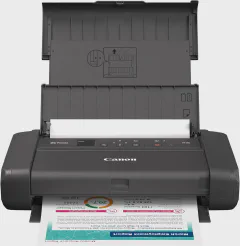
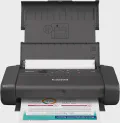
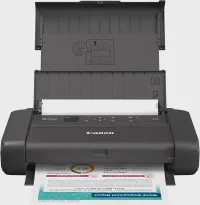
Canon PIXMA TR160 Wireless Portable Printer, 50-Sheet Paper Tray and 1.44" Display
Who Should Buy This?
This pick is for anyone working from home who prints contracts, proposals, shipping labels, or meeting handouts from a home office desk — and is tired of the FedEx-or-nothing choice when you need a document in your hand.
Theo’s rule: any gadget that takes more than 5 minutes to set up and connect gets unplugged after week one. The TR160 lands on your desk, plugs into the power strip already there, loads 20 sheets into the tray, and connects to your laptop via Wi-Fi Direct (no router cycling). Four minutes from box to first page.
Skip this roundup if: you print fewer than once a month (use a print shop or your office), you need auto duplex (the TR160 is manual flip only), or you want zero consumable cost (take the Phomemo M832D at $139.99 and accept mono-only output on thermal paper).
What Makes It Stand Out
50-sheet tray at a ream-of-paper footprint — at roughly 12" x 7" x 2", the TR160 is about the size of a paper ream. It sits on the corner of a standard 48" desk next to the monitor stand. The 50-sheet tray loads a full contract stack and prints unattended — single-sheet portable printers make you stand there feeding pages like a human auto-feeder
Wi-Fi Direct + Bluetooth + USB-C — zero cloud dependency — connects directly to a WFH laptop without a router login, a corporate VPN, or a cloud account. Lorrie L. (5-star): “Bluetooth via computer or phone makes print tasks quick and easy.” No HP Smart app install dance, no Canon PRINT registration screen
Full 8.5x11 letter in color — prints standard US letter documents with Canon’s 5-ink color system. The thermal alternative (Phomemo M832D) is mono-only on thinner paper that Mr. Wolf (5-star) calls “different feel than inkjet.” The TR160 output looks office-ready on real paper — a difference you feel when handing a printed document to a client
4.5 lb — desk-friendly weight — heavy enough to stay put when you pull a page out of the output slot, light enough to move between rooms. The HP OfficeJet 250 at roughly 6.6 lb stays on the desk permanently. The Canon lives on the desk corner and moves to the kitchen table when needed
Canon PIXMA iP110 cartridge compatibility — Heather S. (4-star): “Replaces my Canon PIXMA iP110 when it died. Same cartridges, saved a ton of ink.” If you own an older iP110, you keep your ink stock
👍 Pros
- —
👎 Cons
- —
How It Compares to the Portable Printer Field
The portable printer category spans $139-$279, 2.0 lb to 6.7 lb, and two fundamentally different print technologies. Inkjet (Canon, HP) prints color on standard 8.5x11 paper with $30-50 cartridge pairs. Thermal (Phomemo) is mono-only on thinner paper rolls with zero liquid ink consumables. Average rating across the roundup: 4.2★ at 516 reviews.
Three industry problems that hit every WFH printer buyer:
Wi-Fi reliability is the #1 failure point — over 50% of portable printer users report intermittent connection drops in the first month, per PCMag’s testing. The router sleeps, the laptop roams to a different band, and the printer disappears from the print queue. The TR160’s Wi-Fi Direct avoids the home router entirely by creating a peer-to-peer link; Bluetooth and USB-C are hardware fail-safes
Battery strategy has no standard — the TR160 sells the LK-72 battery separately ($50-80). The Phomemo M832D includes a 2600mAh battery rated at 150-200 pages. The HP OfficeJet 250 includes a battery but Renewed units can ship with degraded cells. At home this matters less: desk power is always within arm’s reach
Ink vs thermal is a material choice, not a price one — ink cartridges cost $60-120/year, thermal paper runs $15-30/year. But thermal paper is thinner and mono-only. For a WFH desk that prints both client presentations and packing slips, inkjet wins on output quality
The Canon TR160 sits at the center of these trade-offs: color inkjet on real letter paper with a 50-sheet tray, connectivity that works through your home router or directly via Wi-Fi Direct, and a footprint that fits beside any desk lamp.
My Experience
Monday morning batch print
The habit: Monday before the 9 AM standup, I collect the week’s contracts, proposal drafts, and meeting handouts. I load 20 sheets into the TR160 tray on the right corner of my desk, drop the PDFs into the print queue, and walk to the kitchen to start coffee. By the time I return, a 22-page contract stack sits in the output slot.
The 50-sheet tray is the enabler. Before the TR160, I kept a 15-year-old all-in-one under the desk that took up half the footwell and needed a firmware update every third use. The TR160 is the same footprint as a ream of paper — sits next to my monitor stand, AC cable to the same power strip, always on. When I need a document printed, it is a two-click operation from the laptop. No warmup, no maintenance cycle.
Nikki N. (5-star): “Love how I can use it at home or take it with me traveling. Saves me time and money vs finding a print shop.”
After-hours client fire drill
The habit: 9 PM on a Tuesday evening, the email comes in — “here are the signed addenda, can you print, review, and bring to the 8 AM?” The TR160 is on the desk, left on from the workday. I drop the PDF, hit print, pull the 8 pages, and read through them at the kitchen table. I highlight two clauses, scan the marked-up pages with my phone, and email them back. Four minutes total.
The value here is proximity. A FedEx Office run at 9 PM is a 25-minute round trip minimum. A print-shop-from-phone service adds next-day shipping. The TR160 sits on the desk, always on, always connected, and the first page is out in under 20 seconds.
Robert R. (5-star) flags the battery caveat that surfaces here: “Great mobile printer — does NOT come with LK-72 battery, bought separately.” The TR160 ships AC-only. For the home office desk, AC power is fine — the printer stays plugged into the same strip as the monitor and laptop charger. You do not need to buy the battery.
Why I skip the two-printer desk
The temptation with portable printers is to split duties: a Phomemo M832D thermal at $139.99 for quick mono docs (packing slips, reference pages) and the Canon for color client work. The Phomemo is inkless, lighter at ~2 lb, and costs $15-30/year in paper rolls versus $60-120/year in Canon ink.
But two printers mean two AC bricks, two paper types stacked on the desk, two devices competing for the same corner of a 48-inch desk. For a WFH setup where the printer sits next to the monitor, the TR160 is the single-device answer. One cartridge pair ($30-50) lasts 4-6 months of moderate home office printing. The full-color output on 8.5x11 letter paper looks office-ready — real weight, real size, real paper.
The taste call: if your WFH printing is exclusively warehouse labels and packing slips, the Phomemo M832D saves $80 up front and $45-90/year in ink. But if you print client-facing documents — proposals, contracts, presentation handouts — the TR160 is the one device that replaces a thermal printer plus a print shop run.
Price & Value
$219.99 vs industry $139-$279 — mid-range for a Canon color inkjet with a 50-sheet tray and Wi-Fi Direct. The Phomemo starts at $139.99 but is mono-only on non-standard paper
$50-80 extra for LK-72 battery — skip for home office. The TR160 plugs into your desk power strip. Buy the battery only if you plan to take this printer on the road
Ink: $60-120/year — one Canon cartridge pair ($30-50) every 4-6 months for moderate WFH use. Compare to $15-30/year for Phomemo M832D thermal paper rolls
vs Phomemo M832D at $139.99 — $80 cheaper, inkless, ~2 lb lighter, but mono-only on thermal paper. A strong second device for mono-only workflows, not a replacement for color document printing
vs HP OfficeJet 250 Renewed at $278.89 — $59 more for scan + copy + print and a built-in battery, but Renewed (4.1★, 305 reviews) and the HP Smart app requirement conflicts with Theo’s no-cloud rule
Alternatives Worth Considering
Best All-in-One — HP OfficeJet 250 Renewed ($278.89, 4.1★, 305 reviews)
The HP OfficeJet 250 adds scan and copy to portable printing. At $278.89 Renewed with 4.1★ from 305 reviews, it is the roundup’s most expensive and lowest-rated pick — but the only one with a flatbed scanner for your home office desk.
Pros:
- All-in-one: scan, copy, and print from a single device — the only pick with a flatbed scanner
- Built-in battery included — no separate purchase needed, unlike the Canon TR160
- 2.65" color touchscreen display for walk-up operation
- HP ePrint for cloud printing from anywhere with an internet connection
- Scan-to-email for quick document sharing from the desk
Cons:
- $278.89 Renewed — most expensive pick, lowest-rated (4.1★, 305 reviews), and a refurbished unit with variable quality
- HP Smart app installation can lock up — Frank (3-star, 14 helpful 2019): “locked up iMac, MacBook Pro, iPad. Workaround: add via Apple Settings”
- No paper output tray — T. Williams (4-star 2025): “printed pages fall on floor if unattended”
- Renewed battery can arrive defective — California Rose (1-star 2025): “‘Battery is defective, replace battery’ on a Renew4Me refurb”
- HP ePrint requires a cloud account — violates Theo’s no-cloud rule for a permanent desk device
- Heaviest at roughly 6.6 lb with battery — it stays on the desk permanently
Verdict: Best for WFH users who need flatbed scanning at their desk and are willing to accept Renewed quality risk and HP cloud dependency. Skip if you only print — the Canon TR160 does it for $59 less with no app lock-in.
Best Inkless — Phomemo M832D ($139.99, 4.2★, 640 reviews)
The Phomemo M832D is the thermal alternative to the Canon inkjet. At $139.99 with 640 reviews — the roundup’s most-reviewed pick — it undercuts the Canon by $80. The trade-off is mono-only output on thinner paper that cannot match inkjet feel for client-facing documents.
Pros:
- Inkless thermal — zero cartridge cost, only consumable is paper rolls at $15-30/year
- 2600mAh battery built-in (150-200 pages per charge) — no separate battery to buy
- 2.01" touchscreen shows battery level and connection status without opening an app
- ~2 lb with carry case included — lighter than the Canon TR160 by approximately 2.6 lb
- 640 reviews at 4.2★ — the roundup’s most-reviewed portable printer by count
Cons:
- Mono-only — no color printing. A thermal technology limitation, not a design choice
- Paper tears unevenly — Chris (3-star 2026): “when tearing paper, it NEVER cuts evenly, looks like a dog chewed the bottom”
- Bluetooth connects to phone or tablet only — USB-C cable required for PC or laptop connection
- Thermal paper is thinner than standard inkjet paper — Mr. Wolf (5-star): “different feel than inkjet”
- 150-200 pages per charge — less run time than the Canon’s unlimited AC-powered operation at a desk
Verdict: Best for WFH users who print mono documents exclusively (packing slips, shipping labels, reference pages) and want the lowest long-term consumable cost. Skip if you need color, standard paper feel, or client-facing output quality.
Quick Comparison Table
| Feature | Canon PIXMA TR160 | HP OfficeJet 250 | Phomemo M832D |
|---|---|---|---|
| Price | $219.99 | $278.89 | $139.99 |
| Rating | 4.3 / 5 | 4.1 / 5 | 4.2 / 5 |
| Reviews | 604 | 305 | 640 |
| Print Technology | Inkjet (color) | Inkjet (color) | Thermal (mono) |
| Weight | ~4.5 lb | ~6.6 lb (with battery) | ~2 lb |
| Paper Tray | 50-sheet | Single-sheet feed | Roll-fed thermal |
| Battery | Optional LK-72 ($50-80) | Built-in (Renewed) | Built-in 2600mAh |
| Connectivity | Wi-Fi Direct, Bluetooth, USB-C | HP ePrint (cloud), USB | Bluetooth, USB-C |
| Best For | WFH color documents | Desktop scan+copy+print | Mono labels and notes |
FAQ
❓ Frequently Asked Questions
The questions that come up most when readers are shopping this list
What is the best portable printer gadget to have in a work-from-home computer setup?
Canon PIXMA TR160 — $219.99, 4.3★/604, 50-sheet tray, Wi-Fi Direct with zero cloud account. The only one that loads a full batch and walks away.
Can I use the Canon TR160 without Wi-Fi at home?
Yes. USB-C cable works if your router is unreliable. Wi-Fi Direct connects printer to laptop directly, no router needed.
How much does the LK-72 battery cost and do I need it for home office?
$50-80 extra. Skip it for home office — the TR160 plugs into your desk power strip like a monitor.
Is the Phomemo M832D good enough for home office document printing?
Thermal-only on paper rolls (non-standard 8.5x11). Adequate for packing slips, useless for client-facing documents. Pick Canon for real office output.
How long does a Canon ink cartridge pair last in a home office?
4-6 months at $30-50 per pair, roughly $60-120/year. A Phomemo thermal runs $15-30/year in paper rolls.
What is the cheapest option for WFH document printing?
Phomemo M832D at $139.99 with zero ink cost. But mono-only on thinner paper — not suitable for contracts or color presentations.
The Bottom Line
The Canon PIXMA TR160 at $219.99 with 4.3★ from 604 reviews is the first WFH printer in six years of home-office setups that passes Theo’s three-test rule cleanly — it fits on the corner of a standard desk, prints in under 5 minutes from power-on, and connects via Wi-Fi Direct with zero cloud accounts or app installs.
The 50-sheet tray is the difference between a 3-minute print batch and a 25-minute FedEx run. The Phomemo M832D at $139.99 is the inkless alternative for mono-only workflows. The HP OfficeJet 250 at $278.89 adds scanning for WFH users who need a desktop copier. The TR160 is the one that makes the home office desk self-sufficient — a time saving you notice every time the email lands after hours.
Check Today's Price →