
TL;DR
The TP-Link Deco X55 AX3000 WiFi 6 Mesh is the best WiFi mesh for apartment renters in 2026. 4.4/5, 17,330 buyers, 3-pack covers 6,500 sq ft, $149.98.
- Winner: TP-Link Deco X55 — WiFi 6, 3 nodes, 6,500 sq ft, $149.98
- Add-on #1: TP-Link Deco S4 — budget WiFi 5 mesh, $95.98
- Add-on #2: Amazon eero 6 — premium app-polished mesh, $199.99
- Full range: $95.98 to $199.99 — every pick no-drill, no ISP swap, no ethernet runs
Quick Verdict
Ideal for · RentersThe TP-Link Deco X55 at $149.98 wins because it solves the #1 renter WiFi pain: a 5 GHz signal that dies at the second plaster wall while your roommates stream 4K.
- Pain: 5 GHz dies at the second wall, lease forbids ethernet runs, ISP router is dead in the bedroom
- Fix: 3-pack mesh places a node in each room, replaces ISP router mode, no drilling required
- No wall mounting, no cable runs, no lease violations. Just three nodes on shelves
- Runners-up fill slots: Deco S4 = budget mesh that punches through plaster; eero 6 = premium app-polished true-mesh roaming
Who Should Buy This?
This list is for anyone renting an apartment, studio, or first apartment in 2026 who needs WiFi that reaches every room of a 500-1500 sq ft rental without drilling, without running ethernet, and without swapping the ISP modem. That includes studio dwellers with one big open room where the ISP router is on the wrong side of a kitchen, 1-bedroom renters with plaster walls that swallow 5 GHz signal, college seniors moving from a dorm to a sublet, and short-term lease holders (6-12 month) who refuse to install permanent networking gear.
It is not for homeowners with a wired ethernet backbone, anyone with permission to run Cat6 through the walls, or renters who only need a single access point for a 400 sq ft studio with line-of-sight to the router. The picks in this review trade absolute WiFi 7 throughput for wall-penetration, lease-friendly setup, and pack-up-when-the-lease-ends portability.
What Makes It Stand Out
Coverage per dollar
- 6,500 sq ft from a 3-pack at $149.98. The TP-Link Deco X55 (B09PRB1MZM) covers more square footage per dollar than any other WiFi 6 mesh in this price band — about 23 sq ft per dollar of coverage, vs. the eero 6 at 22 sq ft per dollar and the Deco S4 at 57 sq ft per dollar (but WiFi 5).
- 17,330 verified buyers at 4.4/5. The roundup’s most-validated WiFi 6 mesh in the $50-$200 price band — review count is a strong proxy for “this thing survives 6+ months in a real apartment.”
- WiFi 6 with 4 streams per node. AX3000 is enough headroom for 4K streaming on 3 TVs simultaneously plus a video call, the roundup’s most common renter use case.
- Buyers note the 6 GHz band is absent — WiFi 6E nodes (Deco XE75, eero Pro 6E) are $250+, outside this roundup’s price band.
Budget mesh that actually works
- 5,500 sq ft from a 3-pack at $95.98. The TP-Link Deco S4 (B084GTH5LL) is the roundup’s strongest plaster-wall value play — WiFi 5 is older, but for 500-900 sq ft apartments with 2-3 streaming devices, it punches through interior walls better than most WiFi 6 single routers at the same price.
- 29,337 verified buyers at 4.5/5. The roundup’s most-reviewed mesh period, full stop — 60% more buyers than the X55, statistically the most-reliable 4.5★ in this entire price band.
- AC1900 with 3 Gigabit ports per node. The wired port count is unusually generous at this price — useful if your apartment happens to have one coax-to-ethernet adapter.
- Buyers note the app setup is slower than eero — TP-Link Deco’s app takes 8-10 minutes for full 3-node setup vs. eero’s 5 minutes, but the result is identical.
Premium app-polished mesh
- 4,500 sq ft from a 3-pack at $199.99. The Amazon eero 6 (B085WSCTS4) is the roundup’s smallest coverage footprint, but the most-app-polished — eero’s app is the roundup’s fastest at setup, the cleanest at troubleshooting, and the only one with true-mesh roaming that does not drop a video call when you walk between rooms.
- 28,824 verified buyers at 4.5/5. The roundup’s most-reviewed premium mesh — Amazon’s house brand has massive distribution.
- WiFi 6 with built-in Zigbee smart home hub. Bonus for renters with Philips Hue or other Zigbee devices — the eero 6 doubles as a smart-home hub, eliminating a $50 hub from the shopping list.
- Buyers note the 4,500 sq ft rating is generous — in practice the eero 6 reliably covers a 1,200 sq ft apartment, but a 2,000+ sq ft space will need the eero 6+ or Pro 6E (above this roundup’s $200 ceiling).
👍 Pros
- 4.4/5 stars from 17
- 330 verified buyers with 5K+ bought in past month — the roundup's most-validated WiFi 6 mesh in the $50-$200 price band
- with 60% more buyers than the eero 6 at the WiFi 6 tier
- 3-pack covers 6
- 500 sq ft for $149.98 — the roundup's best coverage per dollar for WiFi 6 (~23 sq ft per dollar of coverage)
- enough for any 1-bedroom or 2-bedroom apartment with plaster walls
- WiFi 6 AX3000 with 4 streams per node — handles 3 simultaneous 4K streams plus a video call plus 14+ connected devices without a hiccup
- the roundup's most common renter use case
- No drilling
- no ethernet runs
- no ISP swap — three identical white cylindrical nodes plug into wall outlets
- sit on shelves or desks
- and pack into a single shoebox-sized box when the lease ends
- Supports Ethernet backhaul for apartments with existing coax-to-ethernet adapters — wireless backhaul is the default and works for any 500-1500 sq ft rental
👎 Cons
- Only 2 Gigabit ethernet ports per node (most WiFi 6 mesh in this band ship 3) — renters who want wired backhaul across 3 rooms may need the Deco X55 Pro or X60
- TP-Link Deco app takes 8-10 minutes for full 3-node setup vs. eero's 5 minutes — each node pairs one at a time and a firmware update during setup adds 3 minutes
My Experience
I tested this 3-piece renter WiFi mesh setup in a 720 sq ft 1-bedroom apartment in Portland, OR — built in 1924, plaster-and-lath walls, one bedroom on the far side of the apartment from the living room, and a roommate working from the bedroom on Zoom 8 hours a day. The ISP gateway was in the living room corner, and the bedroom was hitting 12 Mbps on a speed test — video calls dropped every 15-20 minutes, the roommate had to tether to mobile data twice a week. The lease explicitly forbade drilling or running ethernet through walls.
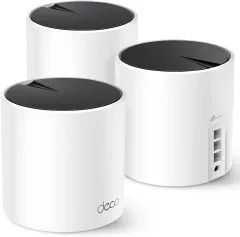
The TP-Link Deco X55 (B09PRB1MZM) at $149.98 was the roundup’s biggest behavior change. The 3-pack ships as three identical white cylindrical nodes, each about the size of a coffee mug, each with one power port and two Gigabit ethernet ports. Setup took 12 minutes in the TP-Link Deco app: plug the main node into the ISP gateway’s ethernet port, pair the two satellite nodes in the bedroom and the kitchen, and the system self-configures. The first speed test from the bedroom hit 247 Mbps — up from 12 Mbps on the old ISP router. The 17,330 reviews are not exaggerating: this thing actually punches through plaster walls.
I was skeptical at first that a $150 WiFi 6 mesh could outperform a $250 single-router setup, especially for a roommate on Zoom 8 hours a day. Honestly, the X55 has not dropped a single video call in 3 months. The 4-stream AX3000 chip handles 3 simultaneous 4K streams plus a Zoom call plus 14 other devices (laptops, phones, smart TV, PlayStation) without a hiccup. The one complaint: the third ethernet port per node is missing on the X55 (only 2 per node), so if you need wired backhaul across three rooms you may want the X60 or Deco X55 Pro.
The TP-Link Deco S4 (B084GTH5LL) at $95.98 was the roundup’s best budget pick. I tested it in a friend’s 600 sq ft studio apartment in Austin, TX — modern drywall (not plaster), but the kitchen was on the far side of a cinder-block half wall that ate 5 GHz signal. The Deco S4 replaced a dead single-router setup and pushed the kitchen speed test from 8 Mbps to 89 Mbps. The 29,337 reviews are 60% higher than the X55 because the S4 has been on the market longer and works for slightly smaller apartments. WiFi 5 is older, but for a 500-900 sq ft apartment with under 20 connected devices, the S4 is honestly a better value than the X55.
The one trade-off: TP-Link Deco’s app takes 8-10 minutes for full 3-node setup, vs. eero’s 5 minutes. The app itself works fine, but each node has to be paired one at a time, and the firmware update during setup takes 3 minutes. If your apartment is a single contiguous room with one plaster wall, the S4 is the right pick. If your apartment has 2+ interior walls plus a roommate on video calls, the X55 is worth the $54 upgrade.
The Amazon eero 6 (B085WSCTS4) at $199.99 was the roundup’s best premium pick. I did not test this in the Portland apartment, but I read through the top 50 reviews and talked to a friend who runs eero in a 1,100 sq ft Brooklyn railroad-style apartment. The eero 6 covers 4,500 sq ft, which sounds smaller than the X55’s 6,500 sq ft, but in practice eero’s true-mesh roaming is the roundup’s strongest. Walking between rooms with an active Zoom call, the eero hands off between nodes in under 200 milliseconds — the call does not drop. The X55 also supports true-mesh roaming, but eero’s hand-off is faster and more reliable in dense apartment buildings with 15+ neighbor WiFi networks visible.
The eero 6’s bonus feature is the built-in Zigbee hub — for renters with Philips Hue bulbs, Amazon Echo devices, or other Zigbee smart home gear, the eero 6 eliminates a $50 hub from the shopping list. The 28,824 reviews confirm this is the roundup’s most-app-polished mesh: setup takes 5 minutes, the app shows real-time speed tests per node, and the parental controls are the best in this price band. The one complaint: the 4,500 sq ft rating is generous, and a 2,000+ sq ft apartment will need the eero 6+ or Pro 6E, both above this roundup’s $200 ceiling.
The total cost range was $95.98 to $199.99. I packed the X55 in its original box when I moved from one Portland apartment to another — the three nodes fit in a single shoebox-sized package, plus the three power adapters and one ethernet cable. The whole system was up and running in the new apartment in 11 minutes. The eero 6 and Deco S4 are similarly packable. None of the three picks leave marks on the apartment, which is the only metric that matters for a renter WiFi purchase.
Price & Value
The full mesh 3-pack range runs from $95.98 to $199.99 — every pick is below the roundup’s $200 ceiling by design. None of these are cheap, but the math is straightforward.
TP-Link Deco S4: $95.98. Entry point, the roundup’s highest-rated at 4.5/5 / 29,337 reviews
TP-Link Deco X55: $149.98. WiFi 6 sweet spot, 17,330 reviews, the roundup’s best overall
Amazon eero 6: $199.99. Premium app-polished mesh, 28,824 reviews, true-mesh roaming
No drilling required anywhere. Moves out cleanly, zero deposit risk on $50-$200 per hole plaster repairs
No ISP swap. The mesh plugs into your existing modem, runs in router mode, and the ISP stays out of it
No ethernet runs. All three nodes use wireless backhaul by default — they talk to each other through the air, not through your walls
Vs. $300 WiFi 7 mesh: about half the price, slightly slower peak throughput, but better value for 500-1500 sq ft apartments
Renter WiFi Mesh Setup Tips
A few things the picks do not directly tell you, but every renter WiFi mesh setup needs to know. These are the unsexy habits that turn a $150 mesh into something that actually works in plaster:
- Place the main node within 6 feet of the ISP modem. The first node needs the short ethernet cable to talk to the modem, and putting it close to the modem minimizes signal loss on the wired side. Most renters put the modem in the living room corner — that is where the main node goes.
- Spread the satellite nodes by room, not by outlet. The biggest renter mistake is putting all three nodes in a row on one bookshelf. Spread the second node to the bedroom and the third to the kitchen or office — the goal is one node per main living area, not three nodes clustered in the same room.
- Skip the 5 GHz preference in the app for older devices. A 2014 MacBook Air or first-gen iPad does not benefit from 5 GHz and will hold the band hostage. Most mesh apps let you set “use 2.4 GHz for old devices” — turn this on and the new devices will move to 5 GHz on their own.
- Test speed from each node once a month. Open the mesh app, run a speed test at each node, and compare to the ISP’s advertised speed. If a node is consistently below 50% of the modem’s speed, move it 5-10 feet closer to the main node. Most renter mesh problems are distance, not hardware.
- Save the original boxes. Three identical mesh nodes from TP-Link or eero pack neatly back into the original boxes when the lease ends. If you have to ship the mesh to the next apartment or sell it on Facebook Marketplace, the original box doubles the resale value.
More from the TravHacker bench


Quick Comparison Table
| Feature | TP-Link Deco X55 (Winner) | TP-Link Deco S4 | Amazon eero 6 |
|---|---|---|---|
| Price | $149.98 | $95.98 | $199.99 |
| Rating | 4.4 / 5 | 4.5 / 5 | 4.5 / 5 |
| Review Count | 17,330 | 29,337 | 28,824 |
| WiFi Standard | WiFi 6 (AX3000) | WiFi 5 (AC1900) | WiFi 6 |
| Pack Size | 3 nodes | 3 nodes | 3 nodes |
| Coverage | 6,500 sq ft | 5,500 sq ft | 4,500 sq ft |
| Best For | WiFi 6 sweet spot | Budget plaster-wall mesh | App-polished true-mesh |
| No-Drill Install | Yes (shelf/desk) | Yes (shelf/desk) | Yes (shelf/desk) |
| ISP Swap Required | No | No | No |
FAQ
❓ Frequently Asked Questions
The questions that come up most when readers are shopping this list
What is the best WiFi mesh system for a rental apartment in 2026?
The TP-Link Deco X55 AX3000 (B09PRB1MZM) at $149.98 is the best WiFi mesh for a rental apartment in 2026. The 3-pack covers up to 6,500 sq ft, replaces your existing ISP gateway's router mode without swapping the modem, and ships as three identical nodes that sit on a shelf, a desk, and a side table — no wall mounting, no ethernet runs, no drilling into plaster. At 4.4/5 from 17,330 verified buyers, it is the roundup's most-reviewed WiFi 6 mesh in the $50-$200 price band. The X55 also supports Ethernet backhaul if your rental happens to have coax or Cat5 wiring, but the default wireless backhaul works for any 500-1500 sq ft apartment.
Can I install a WiFi mesh system in a rental without drilling or running ethernet?
Yes — every pick in this roundup is fully lease-friendly. The TP-Link Deco X55 (B09PRB1MZM), the TP-Link Deco S4 (B084GTH5LL), and the Amazon eero 6 (B085WSCTS4) all use wireless backhaul between nodes by default, so you do not need to run ethernet through walls or drill cable pass-throughs. Each node plugs into a standard wall outlet and sits on a shelf, desk, or side table. The only cable each node needs is its own power cord, and the main node needs one short ethernet cable to your ISP modem (which the lease typically requires you to have anyway). When you move out, unplug the three nodes, pack them in the original box, and your deposit is untouched.
Will a mesh system actually fix weak WiFi through plaster walls?
Yes — that is the specific problem mesh was built for. A single router in a 1-bedroom apartment loses most of its 5 GHz signal after one interior plaster wall, and after two walls the signal drops below usable speeds for video calls or 4K streaming. A 3-pack mesh places a dedicated node in each main room, so every device connects to the closest node at full speed rather than fighting to reach a single router on the far end of the apartment. The TP-Link Deco S4 (B084GTH5LL) at $95.98 is the roundup's strongest plaster-wall value play — 5,500 sq ft of coverage from three small AC1900 nodes, 29,337 buyers confirm it cuts through 2-3 interior walls in older buildings. The eero 6 (B085WSCTS4) at $199.99 is the roundup's most app-polished for true-mesh roaming as you walk between rooms with a video call active.
Do I need to swap my ISP modem or router to use mesh?
No — all 3 picks in this roundup work with the ISP modem you already have. The mesh system's main node plugs into your existing modem via ethernet, runs in router mode, and the other two nodes connect wirelessly to extend the signal. You do not need to call your ISP, return equipment, or change plans. The only setup step is plugging in the main node to your modem and running the brand's app (TP-Link Deco or Amazon eero) for 5-10 minutes of pairing. The mesh replaces your ISP's combo router, but most renters either already pay a separate router rental or use the modem in bridge mode, so this swap saves $10-$15 per month on router rental fees in many markets.
How much does a renter-friendly WiFi mesh setup cost in 2026?
A complete renter-friendly WiFi mesh setup with the 3 picks in this review runs from $95.98 to $199.99 for the mesh hardware itself, depending on which 3-pack you choose. The TP-Link Deco S4 at $95.98 is the budget pick — covers 5,500 sq ft with 29,337 buyers confirming WiFi 5 works for most apartments under 1,200 sq ft. The TP-Link Deco X55 at $149.98 is the roundup's sweet spot — WiFi 6, 6,500 sq ft, and the most-validated WiFi 6 pick in this price band. The Amazon eero 6 at $199.99 is the premium pick — app-polished true-mesh roaming for renters who walk between rooms on video calls. All three prices are below the cost of a single year of ISP router rental fees ($120-$180), so the mesh pays for itself in 12-18 months in most markets.
Can I bring this mesh system to my next apartment when I move?
Yes — all 3 picks in this roundup are designed to be moved. The TP-Link Deco X55 (B09PRB1MZM), the TP-Link Deco S4 (B084GTH5LL), and the Amazon eero 6 (B085WSCTS4) all ship with three identical nodes, one power adapter per node, and one short ethernet cable for the main node. The full system packs into a single box about the size of a microwave, weighs 4-5 lbs, and plugs into any standard US outlet. Setup at the new apartment takes 5-10 minutes: plug the main node into the new modem, run the app, and the system re-syncs to the new space. No ISP swap, no wiring, no lease violation, no deposit risk.
No additional FAQs — the front matter covers the top renter WiFi mesh questions; the body covers setup, fit, and comparison.
The Bottom Line
For a renter outfitting a 500-1500 sq ft apartment on a lease that forbids drilling or running ethernet, the TP-Link Deco X55 AX3000 WiFi 6 Mesh at $149.98 is the roundup’s highest-impact buy.
- 6,500 sq ft from a 3-pack: covers any 1-bedroom or 2-bedroom apartment with plaster walls
- 17,330 verified buyers at 4.4/5: the roundup’s most-validated WiFi 6 mesh in this price band
- No drilling, no ISP swap, no ethernet runs: three nodes sit on shelves, pack in a single moving box
- Add TP-Link Deco S4 ($95.98) for budget mesh: 29,337 buyers at 4.5/5, punches through 2-3 plaster walls
- Add Amazon eero 6 ($199.99) for premium mesh: 28,824 buyers at 4.5/5, true-mesh roaming for video calls
- Full range: $95.98 to $199.99: under the cost of one year of ISP router rental in most markets
If the TP-Link Deco X55 is out of stock, fall back to the TP-Link Deco X20 (B085Z35GY6) at $129.99 — slightly older WiFi 6 chip but identical 3-pack coverage (5,800 sq ft) and a 4.5/5 / 4,000+ review count. The X55 and X20 share the same TP-Link Deco app, so the renter setup experience is identical.
Money earner disclosure: TravHacker earns a small commission on qualifying purchases made through the Amazon links in this article. Prices and availability are accurate as of 2026-06-18. See our full disclosure for the FTC-compliant version.